Solve Props drilling in Vue with Provide and Inject
January 18, 20234 min read
Usually when we need to pass data from parent component to a child component we use props. This is perfectly find solution for a small component tree, but once we are in a large component tree object this solution is not efficient and it is called ‘props drilling’, because we need to pass the props from a parent to the descendant all the way through every descendant on the tree chain, even when the components on the chain do not actually use or need the props.
Example graphic:
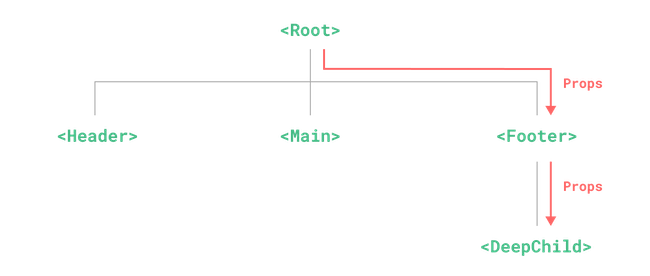
From the example we can see that the component event does not need nor use the props , but it will have to declare and pass them down to the component , which needs them.
This situation can be resolved with Provide and Inject options available. Parent component can act as a provider to its dependance no matter how deeply nested in the component tree. Child components from other hand can inject dependencies provided by the components up in its parent chain.
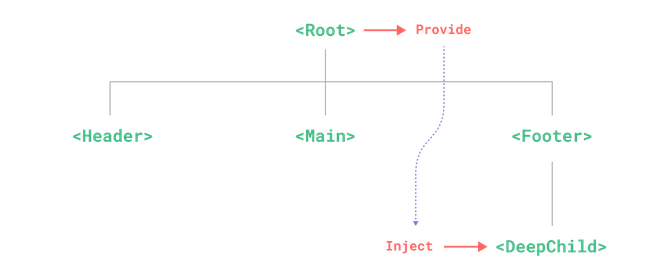
Provide
To provide data to a component’s descendant use provide option:
export default {
    inject: ['message'],
    created() {
        console.log(this.message)// injected value
        }
For each property in the provide object, the key is what is used by the child component to locate the value provided by the parent component , while the value ends up being injected.
If we need to provide a data which is declared in the data() options , then provide option must be a function value.
export default {
    data() {
        return {
            message: 'hello!
        }
    },
    provide() {
        // use function syntax so that we can access `this`
        return {
            message: this.message
        }
    }
}
However is good to point that this does not make the injection reactive.
Provide option can be used in app level as well. Like this data will be available to all components. This is useful when writing plugins, as plugins can not provide values using components.
Inject
To inject data from parent component , inject option must be used
export default {
    inject: ['message'],
    created() {
        console.log(this.message) // injected value
    }
}
Very important the injection is resolved before components own state , so you can access injected properties in data() option
export default {
    inject: ['message'],
    data () {
        return {
            // initial data based on injected value
            fullMessage: this.message
        }
    }
}
Injection Aliasing
When using the inject array syntax the value of the provided property is exposed on the component instance with the same key. If we have local property with the same key name we will not be able to use it. One thing could help is if we inject the property with a different key. For this we need to use object syntax for the inject option.
export default {
    inject: {
        /*local key */ localMessage: {
            from: /* injection key */ 'message'
        }
    }
}
Injection Default Values
By default inject assumes that injected key is provided somewhere in the parent chain tree. In the case key is not provided , a runtime warning will be produced. To avoid this we should use injection default values. If we want inject to work with optional providers we need to declare default value, similar to props.
export default {
    // object syntax is required
    // when declaring default values for injection
    inject: {
        message: {
            from: 'message',//this is optional if using the same key for       injection
            default: 'default value'
        },
         user: {
            // use a factory function for non-primitive values that are expensive
            // to create, or ones that should be unique per component instance
            default: () => ({name: 'John'})
         }
    }
}
Working with Reactivity
In order to make injections reactively linked to the provider. We need to provide computed property by using computed() option:
import { computed } from 'vue'

export default {
    data () {
        return {
            message: 'hello!'
        }
    },
    provide() {
        return {
            // explicitly provide a computed property
            message: computed(() => this.message)
        }
    }
}
Working with Symbol keys
Using string injection keys is doable for small projects , but when it comes to large projects with many dependancies, it is best to use Symbol injection keys to avoid potential collisions.
It is recommended to export the Symbols to dedicated file:
// keys.js
export const myInjectionKey = Symbol()
// in provider component
import { myInjectionKey } from './keys.js'

export default {
    provide () {
        return {
            [myInjectionKey]: {
                /* data to provide */
            }
        }
    }
}

// injector component
import { myInjectionKey } from './keys.js'

export default {
    inject: {
        injected: {from: myInjectionKey}
    }
}
This way we have the keys in one dedicated file and any changes to the keys would be focused in one place.